

Download RAR File Open Knife – Fast, Free RAR Extractor for Windows & Mac
Looking for a secure, fast, and lightweight way to open RAR files? RAR File Open Knife is a specialized tool designed exclusively for extracting RAR archives. Unlike bulky multi-format software, this free app focuses only on RAR files, delivering blazing-fast performance and minimal resource usage.
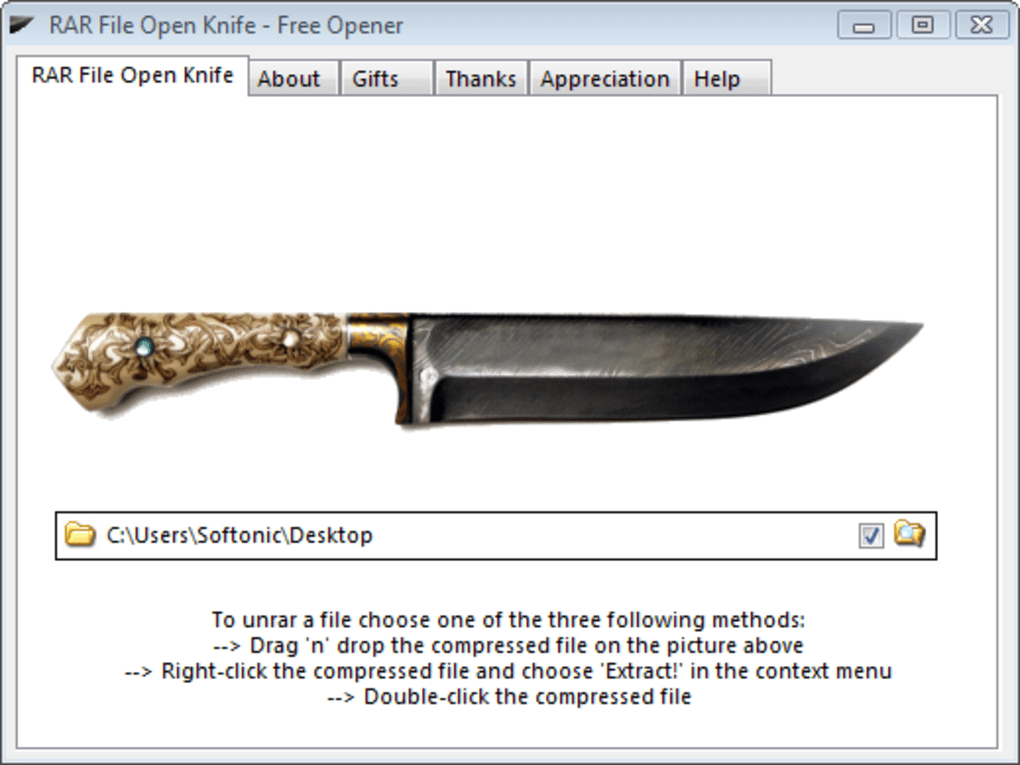
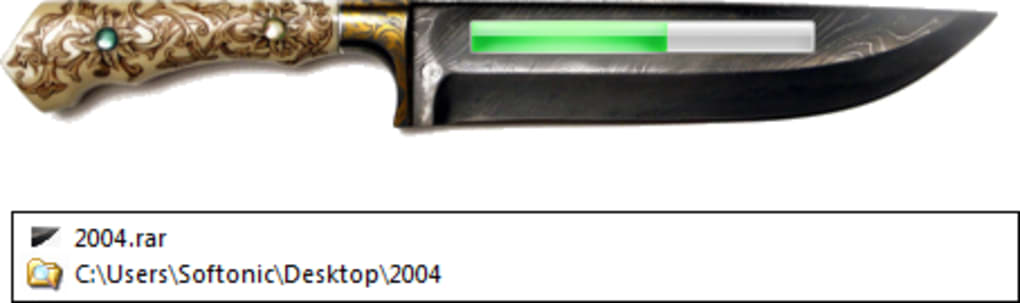
Whether you're on Windows or Mac, RAR File Open Knife simplifies the decompression process with a clean interface and zero setup. Just drag and drop your RAR file into the app window, and it extracts instantly. You can also use the right-click context menu for quick access.
Perfect for users who don’t need advanced features like compression or conversion, this tool is ideal for fast, reliable RAR file extraction.
Key Features of RAR File Open Knife
RAR File Open Knife stands out in a crowded market by doing one thing exceptionally well: extracting RAR files. The software’s minimalist design is intentional—by focusing solely on RAR decompression, it avoids bloat and delivers superior speed. Here are the standout features that make this tool a must-have for anyone dealing with RAR archives:
- Ultra-Fast Extraction – The app is optimized for speed, making it significantly faster than general-purpose tools like 7-Zip or WinRAR, especially when handling large archives.
- Simple Drag-and-Drop Interface – No complex menus. Just drag your RAR file into the app window, and extraction begins immediately.
- Right-Click Context Menu Integration – Right-click any RAR file and select “Extract!” for instant access—ideal for frequent users.
- Customizable Output Folder – Set a default extraction directory to streamline workflows and avoid clutter.
- Lightweight & Secure – The app uses minimal system resources and has no ads, malware, or bundled software.
- Platform Compatibility – Available for both Windows and Mac, making it accessible across major operating systems.
Why Choose RAR File Open Knife Over Other Tools?
Many users rely on comprehensive tools like 7-Zip or WinRAR, which support multiple formats including ZIP, 7Z, and TAR. However, these tools come with added complexity, larger file sizes, and slower performance when handling just RAR files. RAR File Open Knife removes all unnecessary features, reducing startup time and memory usage.
For users who only need to extract RAR archives—such as gamers downloading game mods, students receiving course materials, or professionals handling project files—this app is a game-changer. Its lack of advanced options isn’t a drawback; it’s a design philosophy. By limiting scope, the software becomes more efficient, reliable, and easier to use.
Plus, being free and open-source (as confirmed by the developer), it ensures transparency and security. Even though the interface is plain and includes some unrelated download links (a minor quirk), the core functionality remains untouched and highly effective.
How to Install and Use RAR File Open Knife
Installing RAR File Open Knife is quick and hassle-free. The app is distributed as a portable executable, meaning no installation is required. Here’s how to get started:
- Download the App – Visit the official website and download the version for your operating system (Windows or Mac).
- Extract the ZIP File – The downloaded file is a ZIP archive. Extract it to a folder of your choice—no installer needed.
- Run the Application – Double-click the executable file (e.g.,
RarFileOpenKnife.exeon Windows or the .app file on Mac). - Set Your Default Folder – Go to Settings and define a default output directory for extracted files.
- Start Extracting – Drag any RAR file into the app window, or right-click a RAR file and choose “Extract!” from the context menu.
Once configured, the app remembers your preferences, so you can extract files with minimal effort. The process is fully automated—no need to navigate through folders or select extraction options. This makes it perfect for batch processing or frequent use.
Additionally, since it’s portable, you can run it from a USB drive, making it ideal for use on multiple computers without installation. The app also supports password-protected RAR files—simply enter the password when prompted, and extraction continues seamlessly. Overall, the user experience is smooth, intuitive, and focused on speed.
Compatibility & System Requirements
RAR File Open Knife is compatible with both Windows 7 and later (including Windows 10 and 11) and macOS 10.12 or higher. It doesn’t require administrative privileges, making it suitable for work environments with restricted access. The app is lightweight, consuming less than 10 MB of RAM during operation, which ensures it runs smoothly even on older or low-end machines.
It supports all standard RAR formats, including RAR5, and handles multi-volume archives (R00, R01, etc.) without issues. The software is also safe to use—no telemetry, no ads, and no third-party tracking. Developers recommend scanning the downloaded file with antivirus software before running it, although the app has been verified as clean by multiple security tools.
For users on Android or iOS, there are no native versions, but similar functionality can be achieved via cloud-based tools or third-party apps. However, for desktop users, RAR File Open Knife remains the fastest and most secure option for RAR extraction.
Pros and Cons
Pros
- Extremely fast extraction speed, especially for large RAR files
- Minimal system resource usage – ideal for older devices
- Free to download and use with no hidden costs
- Portable – no installation required, runs from any folder
- Simple, distraction-free interface with easy drag-and-drop support
- Right-click context menu integration for quick access
- Supports password-protected RAR archives
- Secure and clean – no ads, malware, or bundled software
Cons
- Limited to RAR files only – no support for ZIP, 7Z, or other formats
- Plain and outdated interface – lacks modern design elements
- Includes unrelated download links on the main screen (slightly distracting)
- No built-in file preview or archive browsing feature
- No update notifications – users must manually check for new versions
Frequently Asked Questions (FAQ)
Final Verdict & Call to Action
RAR File Open Knife is a powerful, no-frills solution for anyone who needs to extract RAR files quickly and securely. While it lacks the versatility of multi-format tools, its specialization makes it faster, lighter, and more reliable for its intended purpose. If you’re tired of waiting for 7-Zip to open a single RAR file, this app is the perfect alternative. It’s ideal for students, professionals, and casual users who value speed and simplicity. The free download, portable nature, and strong performance make it a standout choice in the compression tool category.
Download RAR File Open Knife today and experience the difference of a tool that does one thing—and does it brilliantly. Whether you're on Windows or Mac, this lightweight app will save you time and effort. Don’t let bulky software slow you down—choose efficiency. Click the download button now and start extracting RAR files in seconds.







